
Sworn Financial Statements

The Smart Way to Complete Your Sworn Financial Statement. Math4Law simplifies the most time-consuming document in Colorado family law. Our platform provides a structured, digital environment to prepare the JDF 1111 Sworn Financial Statement with mathematical precision and professional clarity.
Unlike static paper forms, our digital SFS is dynamic. It grows as you add information, ensuring you have ample space for all assets and debts without the need for separate attachments. By automating all totals and ensuring mandatory fields are addressed, the platform eliminates calculation errors and ensures your disclosures meet the court’s standards. Once complete, you can also generate the JDF 1104 Certificate of Compliance to satisfy your mandatory disclosure requirements.
Colorado law firms receive a one-month free trial to test the full system, while all users can register and create case files with no credit card required. To support all families, calculations and downloads for the SFS are provided at no cost for low-income cases.
Court-Ready Output and Distribution
The application generates the JDF 1111 Sworn Financial Statement and the JDF 1104 Certificate of Compliance, both formatted for immediate filing with the court. The platform provides extensive configuration options, allowing the final document to be tailored to the specific requirements of the case and the preferences of the user.
Users have three primary ways to manage and distribute their completed documents:
Download PDF: Generate and save court-ready PDF files directly to your device.
Print Preview (subscription required): Review the document and adjust the layout before finalization.
Direct Email (subscription required): Send the completed forms to yourself, clients, or opposing counsel directly from within the application.
Advanced Application Features
Pre-Decree and Post-Decree Support
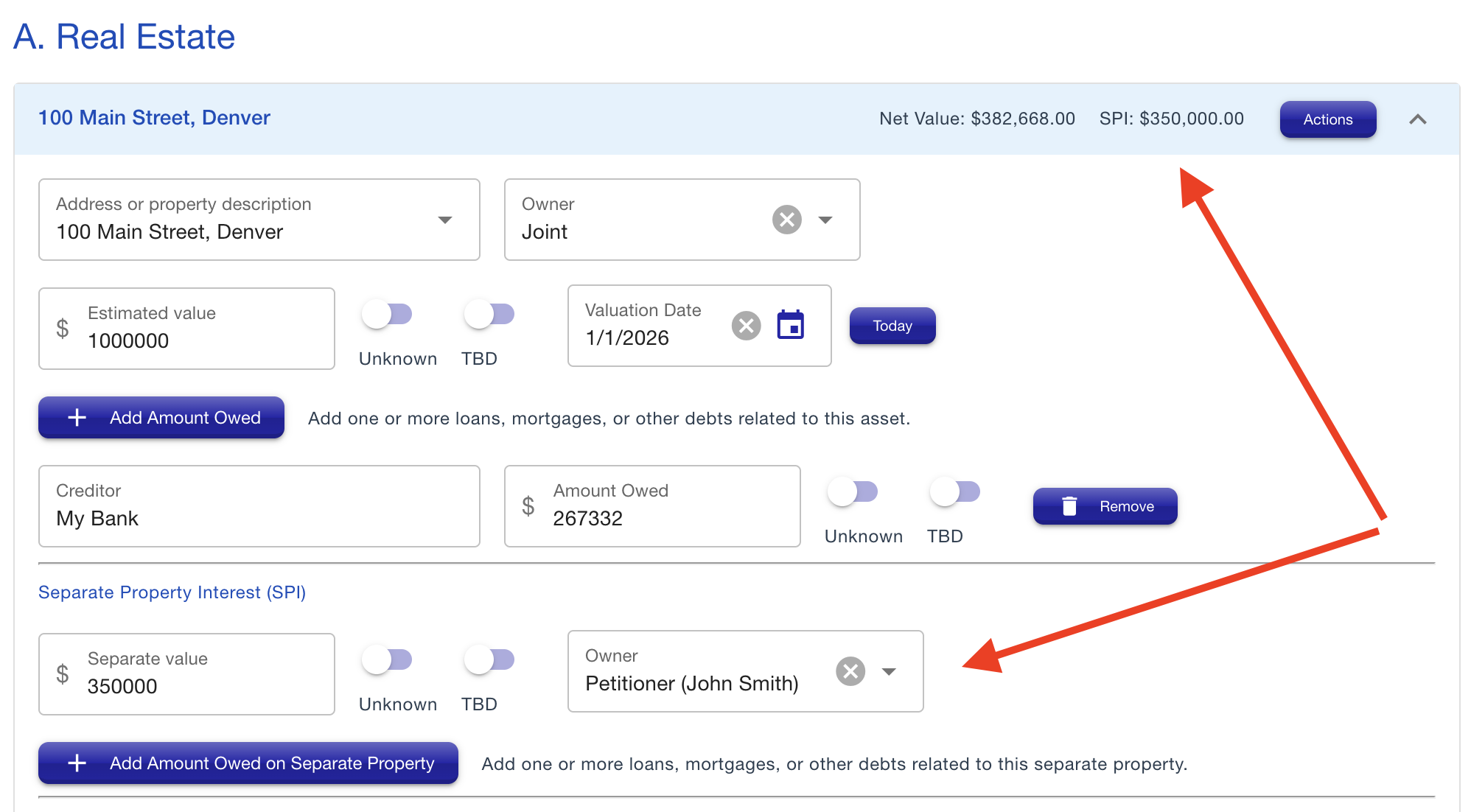
The application handles the specific requirements for both pre-decree and post-decree filings. For pre-decree cases, the platform includes dedicated fields to identify and calculate separate property, ensuring that marital and non-marital assets are clearly distinguished in accordance with Colorado law.
Flexible Data Entry and Organization
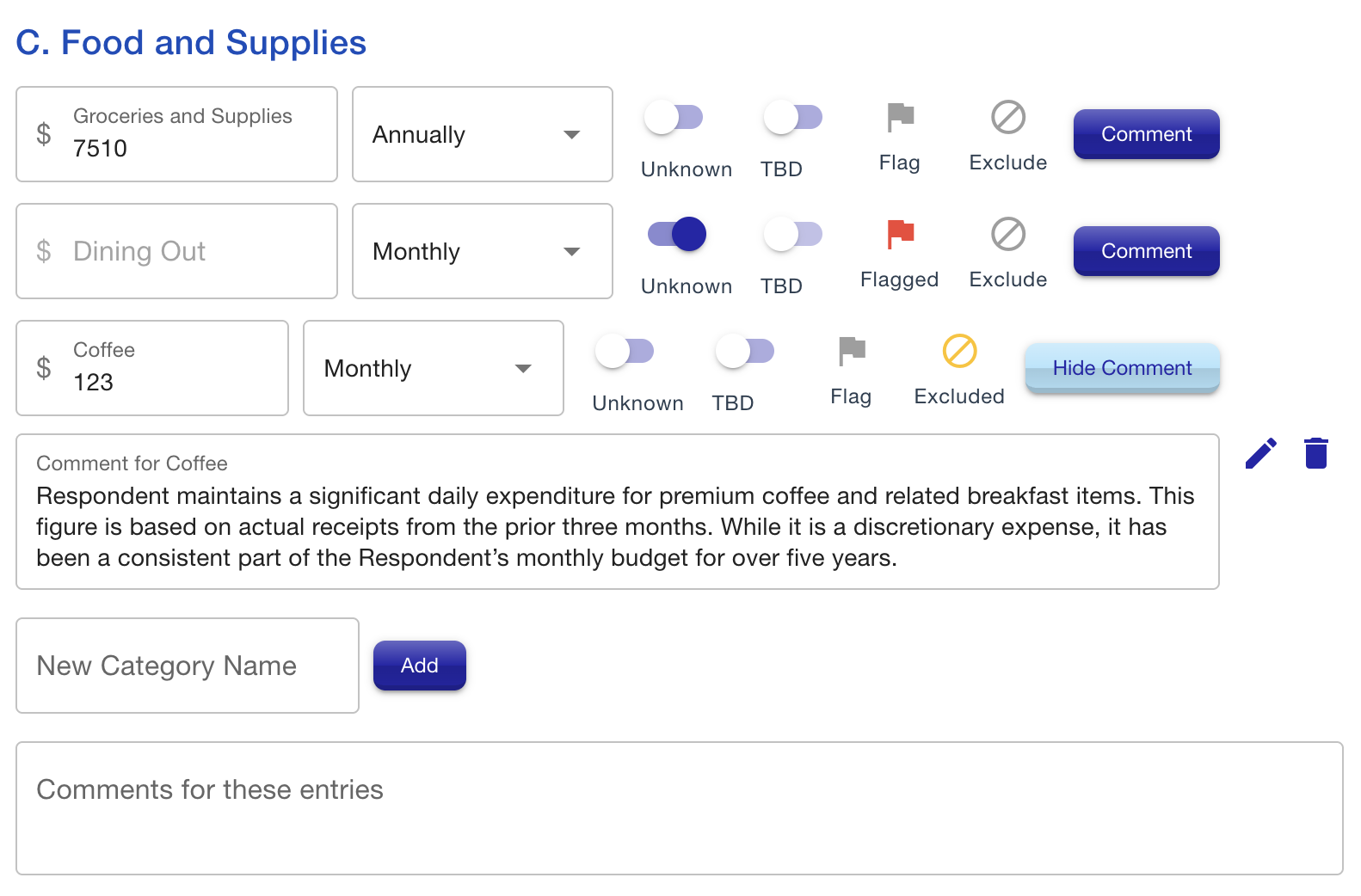
The platform provides a suite of tools to manage the detailed entries for income, deductions, and expenses. These options ensure that users can build a complete financial picture even when specific information is missing or requires further clarification.
Flexible Valuation: Users can enter amounts as either monthly or annual figures, with the system performing the necessary conversions automatically.
Custom Fields: Add custom fields to any section to account for unique financial items that go beyond the standard entries on the official form.
Placeholder Status: Items can be marked as "Unknown" or "TBD" to maintain the document's structure while finalizing specific data points.
Review Flags: Important items can be flagged for later review, ensuring that no detail is overlooked before finalization.
Selective Totals: Users have the option to exclude specific items from the calculated totals, allowing for the inclusion of informative data without impacting the final math.
Detailed Annotations: Support for long-form comments on any field or section allows for thorough explanations or disclosures directly within the document.
Dynamic Property Division and Equalization
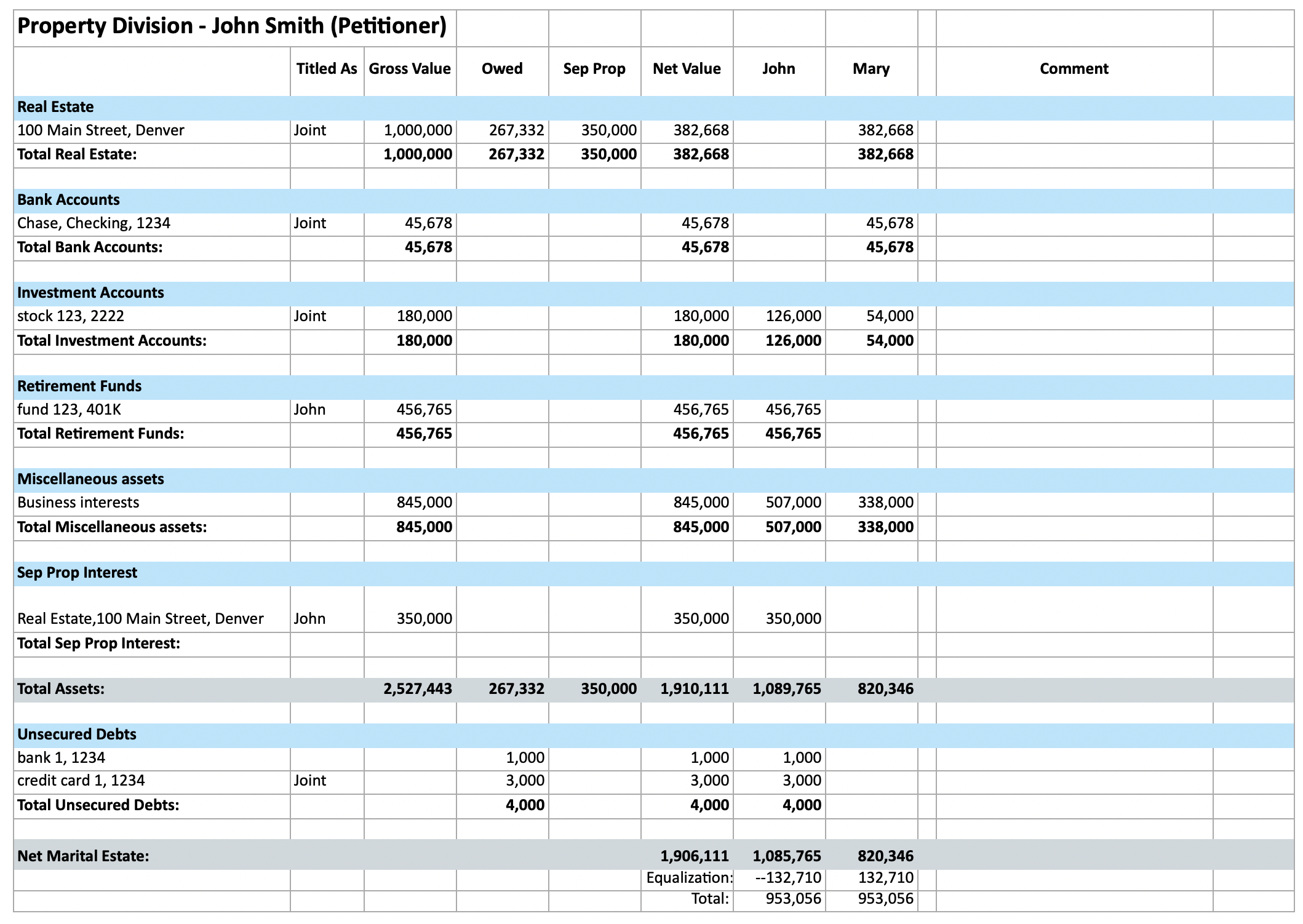
The platform includes a built-in property division tool that allows users to assign assets and debts to each party in real time. As you allocate items, the system immediately updates the balance, providing a clear view of the current division.
Automated Equalization: To streamline negotiations, the application features an auto-calculate option. This tool analyzes unassigned property and automatically distributes it between the parties to achieve a balanced division.
Live Excel Output: The property division generates a live Excel spreadsheet rather than a static report. This allows practitioners to modify data and test scenarios during active mediations or settlement conferences.
No Tiered Pricing: This tool is included for all users at no extra charge. While other platforms require a higher-tier subscription to access property division features, Math4Law provides these capabilities as a standard feature.
Collaborative Client Access
Available exclusively for law firms with a subscription, this feature streamlines the data collection process by allowing clients to enter their own information directly into the platform.
Controlled Collaboration: Law firms can invite clients to update a separate, secure copy of the case file. This allows the client to handle the initial data entry while the firm maintains its own master version.
Bi-Directional Sync: Legal staff can import the client’s data into the firm’s copy or push professional updates back to the client’s file. This "back-and-forth" capability can be used as many times as needed throughout the discovery process.
Maintained Control: By utilizing separate file copies, the attorney or paralegal remains in full control of the final court-ready document, ensuring that only verified information is included in the official filing.
Significant Time Savings: This workflow eliminates the need for manual data entry from paper organizers or email threads, allowing legal staff to focus on reviewing and refining the disclosures rather than typing them.
Simplify Your Financial Disclosures
Join the community of Colorado practitioners who use Math4Law to transform the Sworn Financial Statement into a precise, automated workflow. Whether you are managing complex marital property or a straightforward filing, you can start your first file today with no upfront payment.
Law Firms: Register with your firm email to activate a one-month free trial of the full platform, including collaborative client access and property division.
Individuals: Create an account and build your case file for free. A credit card is only required if your data exceeds the low-income threshold.
Low-Income Cases: SFS preparation and downloads are completely free for cases that remain below the low-income threshold.